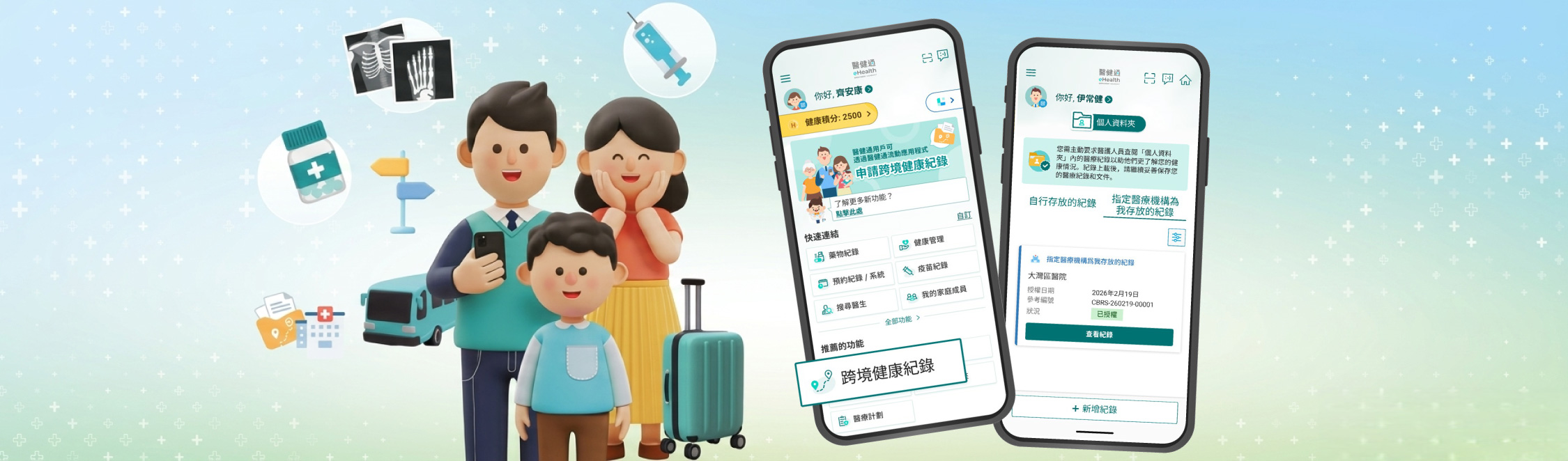
As development in the Greater Bay Area accelerates integration between the Mainland and Hong Kong, many Hong Kong residents frequently travel between the two places for work, while some even choose to retire and settle in the Mainland. The demand for cross-boundary healthcare services is increasing day by day. When seeking medical consultation in the Mainland, a comprehensive electronic health record (eHR) can help doctors make more accurate diagnoses and formulate appropriate follow-up treatment plans.
To meet this need, the eHealth App has therefore been upgraded. All eHealth users in Hong Kong can now apply for their eHRs over the past three years through the “Cross-boundary Health Record” function. This includes allergies, adverse drug reactions, diagnoses, vaccination, medication, and laboratory reports, etc. Citizens can authorise designated medical institutions in the Greater Bay Area to access their medical records in Hong Kong. At the same time, they can self-deposit medical records obtained from consultations in the Mainland into their “Personal Folder” to facilitate cross-boundary medical consultations.
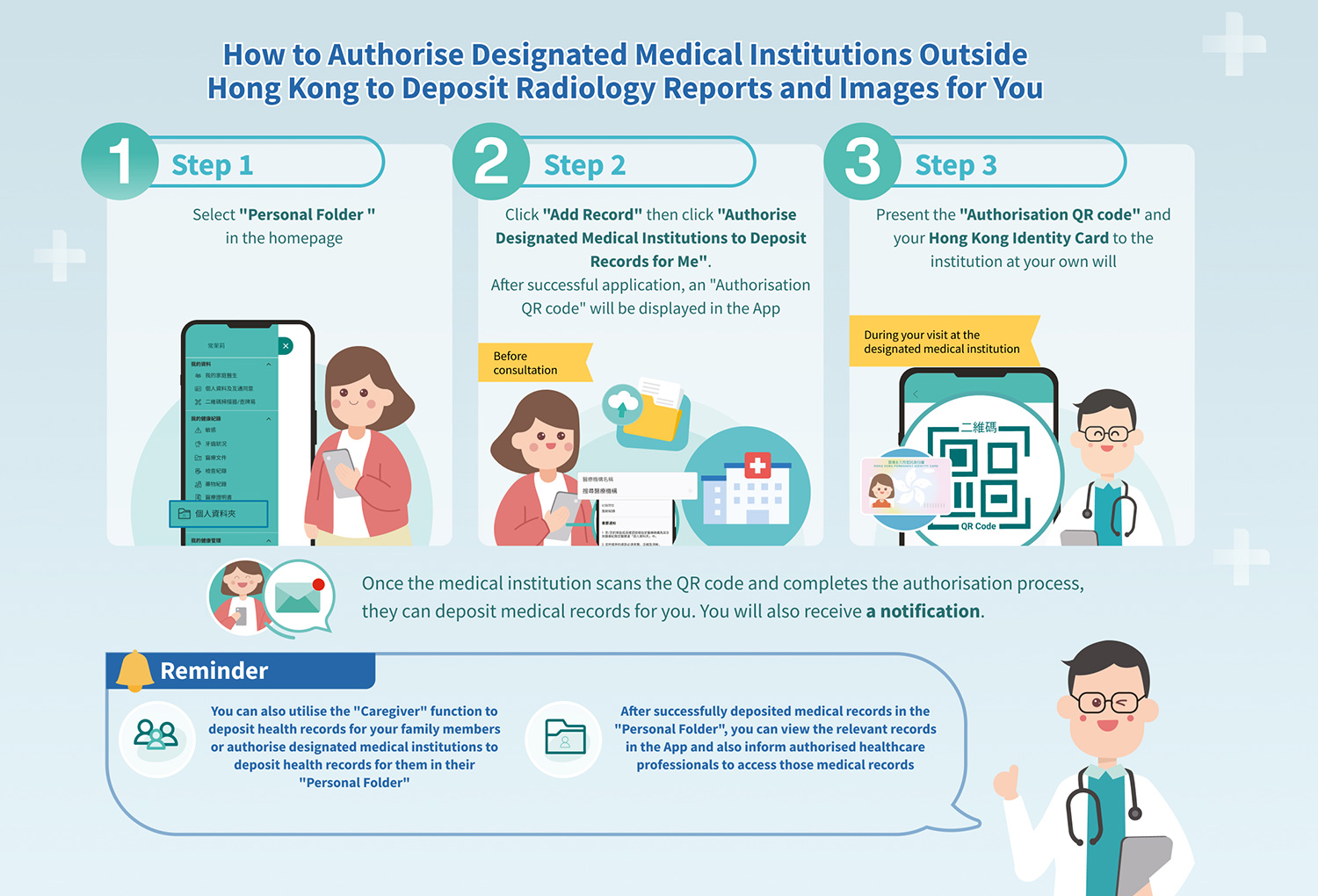
Since January this year, Hong Kong citizens have been able to authorise three designated medical institutions outside Hong Kong through the “Personal Folder” function—namely The University of Hong Kong - Shenzhen Hospital (HKU-SZH), Shenzhen New Frontier United Family Hospital, and Zhongshan Chen Xinghai Hospital of Integrated Traditional Chinese and Western Medicine — to deposit their radiology reports and images into their personal eHealth accounts. This realises the cross-boundary sharing of medical records and provides citizens with more seamless continuity of care.
User Experience Sharing:
Case 1
Mr Wong (45 years old), who works in the technology sector, said: “I usually attend follow-up consultations and undergo health check-ups in Hong Kong, but my work requires me to travel frequently between Hong Kong and the Greater Bay Area. With the ‘Cross-boundary Health Record’ function now available, I can apply through the eHealth App for my health records from the past three years before seeking medical consultation in the Mainland, and then authorise Mainland doctors to view my medical and medication records in Hong Kong. After receiving treatment in the Mainland, I also deposit the consultation records and laboratory results into my ‘Personal Folder’ for my attending doctor in Hong Kong to access easily for follow up. It is both time-saving and convenient. Promoting cross-boundary health record sharing has greatly improved the efficiency and accuracy of diagnosis.”
Case 2
Miss Chan (40 years old), an accountant with a busy work schedule, sets aside time every year for health check-ups. “For me, consulting a doctor or undergoing examinations must be fast and accurate. Since January, before undergoing radiology examinations such as magnetic resonance imaging at a Mainland hospital, eHealth users can first apply through the eHealth App to authorise the hospital to deposit the radiology reports and images into the ‘Personal Folder’. Earlier, while on a business trip in the Mainland, I arranged for a check-up. About a week after completing the examination, the hospital deposited the results into my ‘Personal Folder’. When I returned to Hong Kong for follow-up consultation, I was able to authorise my doctor to view the relevant results. This saved my time of repeating examinations, and the doctor could immediately follow up on treatment. I can also view the relevant images on my phone. It is very simple and convenient, and helps me better understand my own health condition.”
Case 3
Uncle Ho (72 years old), a retired chronic patient living in the Mainland, said: “Since I need regular follow-up consultations and treatment in both Hong Kong and the Mainland, I used to have to carry a large number of films/reports back to Hong Kong every time, which was troublesome and difficult to carry them. What worried me most was forgetting or losing them on the way. Fortunately, I can now authorise the hospital in Shenzhen through the eHealth App to deposit the X-ray images and reports into my ‘Personal Folder’. When I return to Hong Kong for follow-up consultation, I can authorise my doctor to access the radiology images and reports from the Mainland hospital. There is no need to carry stacks of hard-copy reports while rushing for transport and border crossing. That makes things much easier for me.”
Robust Safeguard Mechanisms Ensure Data Security
The “Cross-boundary Health Record” function of eHealth incorporates strict protection mechanisms. After the system verifies a user’s application, it provides the user’s health records to the specified and accredited medical institutions outside Hong Kong via the eHealth website. Healthcare professionals at the relevant institutions must scan the user’s “Application QR Code” and “Password QR Code” before they can access the health records. The relevant QR codes are valid for only 30 days, and the “Password QR Code” expires 24 hours after use, ensuring that others cannot obtain the data and effectively safeguarding information security. In addition, to ensure that medical institutions outside Hong Kong can correctly upload citizens’ radiology images to eHealth, the institution must enter the citizen’s key personal data (Hong Kong Identity Card number, English name, gender, and date of birth) during registration, and verify consistency with the records in the eHealth system at the time of upload. This prevents images from being mistakenly deposited into the wrong citizen’s eHealth account.
Download the eHealth App Now and Experience the Latest Functions
To respond to the growing public demand for healthcare services, especially cross-boundary healthcare services, eHealth App will continue to optimise its functions and user experience, making health management easier and more convenient. Whether for daily health management or seeking medical treatment in the Mainland, remember to download the eHealth App. For more information, please visit the eHealth thematic webpage.
“Cross-boundary Health Record” details: https://app.ehealth.gov.hk/cross-boundary-health-record
“Personal Folder” details: https://app.ehealth.gov.hk/personal-folder